ForceSensor
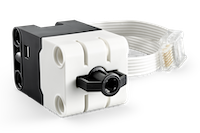
The LEGO® Education SPIKE™ Prime Force Sensor (also known as the LEGO® Technic Force Sensor) can measure pressure of up to 10 newtons (N), but it can also be used as a touch sensor or a simple button.
- class buildhat.ForceSensor(port, threshold_force=1)
Force sensor
- Parameters:
port – Port of device
- Raises:
DeviceError – Occurs if there is no force sensor attached to port
- callback(func)
Set callback function
- Parameters:
func – Callback function
- property connected
Whether device is connected or not
- Returns:
Connection status
- static desc_for_id(typeid)
Translate integer type id to something more descriptive than the device name
- Parameters:
typeid – Type of device
- Returns:
Description of device
- property description
Device on port info
- Returns:
Device description
- deselect()
Unselect data from mode
- get()
Extract information from device
- Returns:
Data from device
- Raises:
DeviceError – Occurs if device not in valid mode
- get_force()
Return the force in (N)
- Returns:
The force exerted on the button
- Return type:
int
- get_peak_force()
Get the maximum force registered since the sensor was reset
(The sensor gets reset when the firmware is reloaded)
- Returns:
0 - 100
- Return type:
int
- property interval
Interval between data points in milliseconds
- Getter:
Gets interval
- Setter:
Sets interval
- Returns:
Device interval
- Return type:
int
- is_pressed()
Get whether the button is pressed
- Returns:
If button is pressed
- Return type:
bool
- isconnected()
Whether it is connected or not
- Raises:
DeviceError – Occurs if device no longer the same
- mode(modev)
Set combimode or simple mode
- Parameters:
modev – List of tuples for a combimode, or integer for simple mode
- property name
Determine name of device on port
- Returns:
Device name
- static name_for_id(typeid)
Translate integer type id to device name (python class)
- Parameters:
typeid – Type of device
- Returns:
Name of device
- off()
Turn off sensor
- on()
Turn on sensor
- reverse()
Reverse polarity
- select()
Request data from mode
- Raises:
DeviceError – Occurs if device not in valid mode
- property threshold_force
Threshold force
- Getter:
Returns threshold force
- Setter:
Sets threshold force
- Returns:
Threshold force
- property typeid
Type ID of device
- Returns:
Type ID
- property typeidcur
Type ID currently present
- Returns:
Type ID
- wait_until_pressed(force=1)
Wait until the button is pressed
- Parameters:
force – Optional
- wait_until_released(force=0)
Wait until the button is released
- Parameters:
force – Optional
- property when_pressed
Handle force events
- Getter:
Returns function to be called when pressed
- Setter:
Sets function to be called when pressed
- Returns:
Callback function
- property when_released
Handle force events
- Getter:
Returns function to be called when released
- Setter:
Sets function to be called when released
- Returns:
Callback function
Example
"""Example using force sensor"""

from signal import pause

from buildhat import ForceSensor, Motor

motor = Motor('A')
button = ForceSensor('D', threshold_force=1)

print("Waiting for button to be pressed fully and released")

button.wait_until_pressed(100)
button.wait_until_released(0)

motor.run_for_rotations(1)

print("Wait for button to be pressed")

button.wait_until_pressed()
motor.run_for_rotations(2)


def handle_pressed(force):
    """Force sensor pressed

    :param force: Force value
    """
    print("pressed", force)


def handle_released(force):
    """Force sensor released

    :param force: Force value
    """
    print("released", force)


button.when_pressed = handle_pressed
button.when_released = handle_released
pause()