DistanceSensor
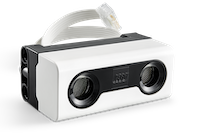
The LEGO® Education SPIKE™ Distance Sensor behaves like a conventional ultrasonic range finder but also has four LEDs that can be used to create the “eyes” of a robot. Each LED can be controlled individually.
- class buildhat.DistanceSensor(port, threshold_distance=100)
Distance sensor
- Parameters:
port – Port of device
- Raises:
DeviceError – Occurs if there is no distance sensor attached to port
- callback(func)
Set callback function
- Parameters:
func – Callback function
- property connected
Whether device is connected or not
- Returns:
Connection status
- static desc_for_id(typeid)
Translate integer type id to something more descriptive than the device name
- Parameters:
typeid – Type of device
- Returns:
Description of device
- property description
Device on port info
- Returns:
Device description
- deselect()
Unselect data from mode
- property distance
Obtain previously stored distance
- Getter:
Returns distance
- Returns:
Stored distance
- eyes(*args)
Brightness of LEDs on sensor
(Sensor Right Upper, Sensor Left Upper, Sensor Right Lower, Sensor Left Lower)
- Parameters:
args – Four brightness arguments of 0 to 100
- Raises:
DistanceSensorError – Occurs if invalid brightness passed
- get()
Extract information from device
- Returns:
Data from device
- Raises:
DeviceError – Occurs if device not in valid mode
- get_distance()
Return the distance from ultrasonic sensor to object
- Returns:
Distance from ultrasonic sensor
- Return type:
int
- property interval
Interval between data points in milliseconds
- Getter:
Gets interval
- Setter:
Sets interval
- Returns:
Device interval
- Return type:
int
- isconnected()
Whether it is connected or not
- Raises:
DeviceError – Occurs if device no longer the same
- mode(modev)
Set combimode or simple mode
- Parameters:
modev – List of tuples for a combimode, or integer for simple mode
- property name
Determine name of device on port
- Returns:
Device name
- static name_for_id(typeid)
Translate integer type id to device name (python class)
- Parameters:
typeid – Type of device
- Returns:
Name of device
- off()
Turn off sensor
- on()
Turn on the sensor
- reverse()
Reverse polarity
- select()
Request data from mode
- Raises:
DeviceError – Occurs if device not in valid mode
- property threshold_distance
Threshold distance value
- Getter:
Returns threshold distance
- Setter:
Sets threshold distance
- Returns:
Threshold distance
- property typeid
Type ID of device
- Returns:
Type ID
- property typeidcur
Type ID currently present
- Returns:
Type ID
- wait_for_in_range(distance)
Wait until object is closer than specified distance
- Parameters:
distance – Distance
- wait_for_out_of_range(distance)
Wait until object is farther than specified distance
- Parameters:
distance – Distance
- property when_in_range
Handle motion events
- Getter:
Returns function to be called when in range
- Setter:
Sets function to be called when in range
- Returns:
In range callback
- property when_out_of_range
Handle motion events
- Getter:
Returns function to be called when out of range
- Setter:
Sets function to be called when out of range
- Returns:
Out of range callback
Example
"""Example for distance sensor"""

from signal import pause

from buildhat import DistanceSensor, Motor

motor = Motor('A')
dist = DistanceSensor('D', threshold_distance=100)

print("Wait for in range")
dist.wait_for_in_range(50)
motor.run_for_rotations(1)

print("Wait for out of range")
dist.wait_for_out_of_range(100)
motor.run_for_rotations(2)


def handle_in(distance):
    """Within range

    :param distance: Distance
    """
    print("in range", distance)


def handle_out(distance):
    """Out of range

    :param distance: Distance
    """
    print("out of range", distance)


dist.when_in_range = handle_in
dist.when_out_of_range = handle_out
pause()